

Want to present a PDF like a PowerPoint? With PDF Reader Pro, you can turn your PDF into Slideshow. In Slideshow Mode, all the toolbars will be hidden for a better reading experience for your audiences. You can also use the laser pointer or paint tool to highlight the key points. Follow the steps to present your PDF file now:
1. Open a file with PDF Read Pro, then click Page Display  on the toolbar, choose Slideshow.
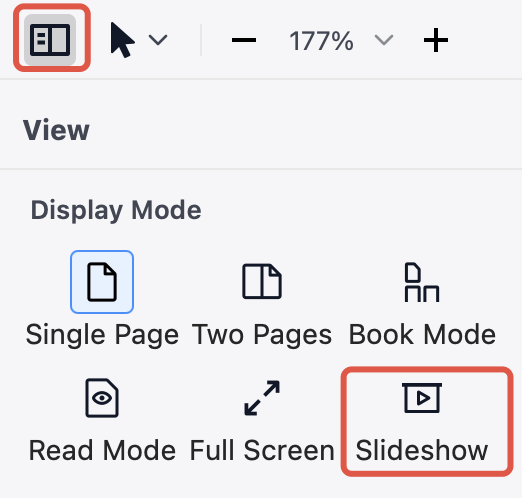
2. Then you can:
-
Tap Laser Pen to highlight the part you are explaining

-
Select one color, and draw freely to emphasize the key point.

3. Click the back button  on the upper left corner to exit Slideshow Mode.
Besides Slideshow Mode, we also provide you with extensive reading modes. To view a PDF like a book, turn on Read Mode. To view the different pages at the same time, choose Split View.
PDF Reader Pro will surely give you a better reading experience. Click Download to get 7-day free trial now! Click PDF Reader Pro to get more information.


 Support Chat
  PDF Reader Pro